<!DOCTYPE HTML PUBLIC "-//IETF//DTD HTML//EN">
<html>

<head>
<meta http-equiv="Content-Type"
content="text/html; charset=iso-8859-1">
<meta name="GENERATOR" content="Microsoft FrontPage 2.0">
<title>Sets</title>
</head>

<body bgcolor="#FFFFFF">

<table border="0" width="100%">
    <tr>
        <td><font size="6"><strong>Sets</strong></font></td>
        <td align="right"><a href="table.html"><img
        src="../image/previous.gif" alt="Previous" border="0"
        width="40" height="40"></a><a href="dispenser.html"><img
        src="../image/next.gif" alt="Next" border="0" width="40"
        height="40"></a></td>
    </tr>
</table>

<hr size="1">

<p align="center"><!--webbot bot="ImageMap" startspan
rectangle=" (223,313) (393, 345)  flatshort/ds_multiarrayed_hash_set.html"
rectangle=" (53,313) (155, 345)  flatshort/ds_hash_set.html"
rectangle=" (214,239) (404, 270)  flatshort/ds_multiarrayed_sparse_set.html"
rectangle=" (24,239) (187, 269)  flatshort/ds_arrayed_sparse_set.html"
rectangle=" (136,164) (258, 196)  flatshort/ds_sparse_set.html"
rectangle=" (274,89) (363, 119)  flatshort/ds_resizable.html"
rectangle=" (154,88) (242, 120)  flatshort/ds_bilinear.html"
rectangle=" (38,91) (119, 120)  flatshort/ds_set.html"
rectangle=" (33,13) (121, 44)  flatshort/ds_linear.html"
src="image/set.gif" border="0" width="424" height="363" --><MAP NAME="FrontPageMap0"><AREA SHAPE="RECT" COORDS="223, 313, 393, 345" HREF="flatshort/ds_multiarrayed_hash_set.html"><AREA SHAPE="RECT" COORDS="53, 313, 155, 345" HREF="flatshort/ds_hash_set.html"><AREA SHAPE="RECT" COORDS="214, 239, 404, 270" HREF="flatshort/ds_multiarrayed_sparse_set.html"><AREA SHAPE="RECT" COORDS="24, 239, 187, 269" HREF="flatshort/ds_arrayed_sparse_set.html"><AREA SHAPE="RECT" COORDS="136, 164, 258, 196" HREF="flatshort/ds_sparse_set.html"><AREA SHAPE="RECT" COORDS="274, 89, 363, 119" HREF="flatshort/ds_resizable.html"><AREA SHAPE="RECT" COORDS="154, 88, 242, 120" HREF="flatshort/ds_bilinear.html"><AREA SHAPE="RECT" COORDS="38, 91, 119, 120" HREF="flatshort/ds_set.html"><AREA SHAPE="RECT" COORDS="33, 13, 121, 44" HREF="flatshort/ds_linear.html"></MAP><img src="image/set.gif" border="0" width="424" height="363" usemap="#FrontPageMap0"><!--webbot
bot="ImageMap" i-checksum="50988" endspan --></p>

<h2>Class <em><tt>DS_SET</tt></em></h2>

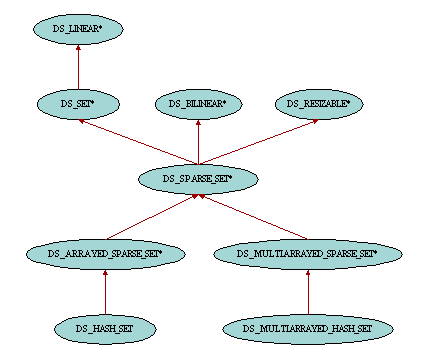
<p>Sets are data structures whose items appear only once.
Therefore <a href="flatshort/ds_set.html#occurrences"><font
color="#008080"><em><tt>occurrences</tt></em></font></a> has
either value <font color="#808000"><em><tt>1</tt></em></font> or <font
color="#808000"><em><tt>0</tt></em></font> depending on the fact
that the object is included in the set or not. The main property
of sets is that they can be compared using boolean queries: <a
href="flatshort/ds_set.html#is_subset"><font color="#008080"><em><tt>is_subset</tt></em></font></a>
to know whether all items of one set are included in another set,
<a href="flatshort/ds_set.html#is_superset"><font color="#008080"><em><tt>is_superset</tt></em></font></a>
to know whether one set contains all items of another set, and <a
href="flatshort/ds_set.html#is_disjoint"><font color="#008080"><em><tt>is_disjoint</tt></em></font></a>
to find out whether two sets have no item in common. The class <a
href="flatshort/ds_set.html"><font color="#008080"><em><tt>DS_SET</tt></em></font></a>
has also four basic operations: <a
href="flatshort/ds_set.html#append"><font color="#008080"><em><tt>append</tt></em></font></a>
to get the union of two sets, <a
href="flatshort/ds_set.html#intersect"><font color="#008080"><em><tt>intersect</tt></em></font></a>
removes the items which are not in the second set, <a
href="flatshort/ds_set.html#subtract"><font color="#008080"><em><tt>subtract</tt></em></font></a>
removes the items which are also included in the second set, and <a
href="flatshort/ds_set.html#symdif"><font color="#008080"><em><tt>symdif</tt></em></font></a>
to get the symmetric difference.</p>

<h2>Class <em><tt>DS_HASH_SET</tt></em></h2>

<p>One possible implementation of sets is hash sets. A hash set
is typically made up of an array where items are accessed by
integer index. Therefore the items used in the hash sets should
provide a means to yield such integer value through a hashing
mechanism. This is exactly what feature <font color="#008080"><em><tt>hash_code</tt></em></font>
from <font color="#008080"><em><tt>HASHABLE</tt></em></font> is
for, and therefore the generic parameter of <a
href="flatshort/ds_hash_set.html"><font color="#008080"><em><tt>DS_HASH_SET</tt></em></font></a>
is constrained by <font color="#008080"><em><tt>HASHABLE</tt></em></font>.
Thanks to this implementation, features of hash sets are usually
more efficient than linked implementations since access time in
an array is bounded by a constant regardless of the number of
items in the container. However the hash code associated with the
items is not necessarily unique, and therefore collisions may
happen and hence slow down the process. Therefore, as for hash
tables, the efficiency of hash sets depends on the number of
collisions that may occur in the set. Please have a look at the
chapter about <a href="table.html#DS_HASH_TABLE">hash tables</a>
for further discussions about hash codes, collisions and how to
avoid performance degradations.</p>

<p>The class <font color="#008080"><em><tt>DS_HASH_SET </tt></em></font>provides
traversal facilities inherited from <a
href="traversal.html#DS_BILINEAR"><font color="#008080"><em><tt>DS_BILINEAR</tt></em></font></a>.
Although all items will be visited once and only once during a
traversal, they will be traversed in an unpredictable order and
subsequent traversals may traverse the items in different orders.
This is because a hash set is not an ordered container as can a
list be. Items are not inserted before or after other items in
the hash set but based on a hashing mechanism and
collision-resolution algorithm. The only way to get a guaranteed
ordered hash set with the current implementation is to use
exclusively feature <a
href="flatshort/ds_hash_set.html#force_last"><font
color="#008080"><em><tt>force_last</tt></em></font></a> to insert
items.</p>

<h2>Class <em><tt>DS_MULTIARRAYED_HASH_SET</tt></em></h2>

<p>When hash sets contain a very large number of items, the
implementation of <font color="#008080"><em><tt>DS_HASH_SET </tt></em></font>may
reach some limits since the internal arrays become too huge and
resizing them may yield memory problems. The class <a
href="flatshort/ds_multiarrayed_hash_set.html"><font
color="#008080"><em><tt>DS_MULTIARRAYED_HASH_SET</tt></em></font></a><font
color="#008080"><em><tt> </tt></em></font>provides the same
functionalities as <font color="#008080"><em><tt>DS_HASH_SET </tt></em></font>but
uses a sequence of fixed size arrays instead of a single array
for its implementation. These array chunks are only created when
first accessed and resizing the whole set does only require to
add one or several chunks to the sequence and therefore avoids
having to resize big arrays.</p>

<hr size="1">

<table border="0" width="100%">
    <tr>
        <td><address>
            <font size="2"><b>Copyright © 2001-2005</b></font><font
            size="1"><b>, </b></font><font size="2"><strong>Eric
            Bezault</strong></font><strong> </strong><font
            size="2"><br>
            <strong>mailto:</strong></font><a
            href="mailto:ericb@gobosoft.com"><font size="2">ericb@gobosoft.com</font></a><font
            size="2"><br>
            <strong>http:</strong></font><a
            href="http://www.gobosoft.com"><font size="2">//www.gobosoft.com</font></a><font
            size="2"><br>
            <strong>Last Updated:</strong> 13 February 2005</font><br>
            <!--webbot bot="PurpleText"
            preview="
$Date$ 
$Revision$" --> 
        </address>
        </td>
        <td align="right" valign="top"><a
        href="http://www.gobosoft.com"><img
        src="../image/home.gif" alt="Home" border="0" width="40"
        height="40"></a><a href="index.html"><img
        src="../image/toc.gif" alt="Toc" border="0" width="40"
        height="40"></a><a href="table.html"><img
        src="../image/previous.gif" alt="Previous" border="0"
        width="40" height="40"></a><a href="dispenser.html"><img
        src="../image/next.gif" alt="Next" border="0" width="40"
        height="40"></a></td>
    </tr>
</table>
</body>
</html>
