<!DOCTYPE HTML PUBLIC "-//IETF//DTD HTML//EN">
<html>

<head>
<meta http-equiv="Content-Type"
content="text/html; charset=iso-8859-1">
<meta name="GENERATOR" content="Microsoft FrontPage 2.0">
<title>Absolute Times</title>
</head>

<body bgcolor="#FFFFFF">

<table border="0" width="100%">
    <tr>
        <td><font size="6"><strong>Absolute Times</strong></font></td>
        <td align="right"><a href="index.html"><img
        src="../image/previous.gif" alt="Previous" border="0"
        width="40" height="40"></a><a href="duration.html"><img
        src="../image/next.gif" alt="Next" border="0" width="40"
        height="40"></a></td>
    </tr>
</table>

<hr size="1">

<p align="center"><!--webbot bot="ImageMap" startspan
rectangle=" (158,315) (255, 346)  flatshort/dt_date_time.html"
rectangle=" (316,241) (399, 273)  flatshort/dt_time.html"
rectangle=" (145,242) (272, 271)  flatshort/dt_date_time_value.html"
rectangle=" (16,241) (96, 271)  flatshort/dt_date.html"
rectangle=" (215,166) (311, 196)  flatshort/dt_time_value.html"
rectangle=" (102,166) (200, 197)  flatshort/dt_date_value.html"
rectangle=" (153,91) (264, 121)  flatshort/dt_absolute_time.html"
src="image/absolute.gif" border="0" width="413" height="358" --><MAP NAME="FrontPageMap0"><AREA SHAPE="RECT" COORDS="158, 315, 255, 346" HREF="flatshort/dt_date_time.html"><AREA SHAPE="RECT" COORDS="316, 241, 399, 273" HREF="flatshort/dt_time.html"><AREA SHAPE="RECT" COORDS="145, 242, 272, 271" HREF="flatshort/dt_date_time_value.html"><AREA SHAPE="RECT" COORDS="16, 241, 96, 271" HREF="flatshort/dt_date.html"><AREA SHAPE="RECT" COORDS="215, 166, 311, 196" HREF="flatshort/dt_time_value.html"><AREA SHAPE="RECT" COORDS="102, 166, 200, 197" HREF="flatshort/dt_date_value.html"><AREA SHAPE="RECT" COORDS="153, 91, 264, 121" HREF="flatshort/dt_absolute_time.html"></MAP><img src="image/absolute.gif" border="0" width="413" height="358" usemap="#FrontPageMap0"><!--webbot
bot="ImageMap" i-checksum="17744" endspan --></p>

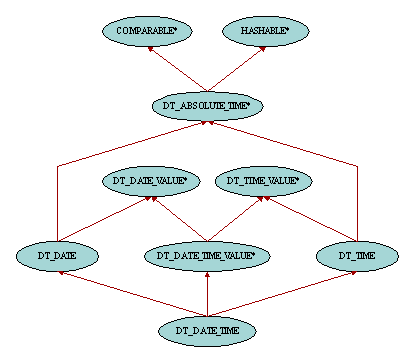
<p>The notion of date and time can be represented with an
oriented axis with values in the past on the left and values in
the future on the right. Date and time are absolute values which
can be compared using a total order relationship based on this
time axis representation. Therefore class <a
href="flatshort/dt_absolute_time.html"><font color="#008080"><em><tt>DT_ABSOLUTE_TIME</tt></em></font></a>
is a descendant of <font color="#008080"><em><tt>COMPARABLE</tt></em></font>.
It also inherits from <font color="#008080"><em><tt>HASHABLE</tt></em></font>
in order to allow dates and times to be used as keys in hash
tables. There are three kinds of absolute times. Times, instances
of class <a href="flatshort/dt_time.html"><font color="#008080"><em><tt>DT_TIME</tt></em></font></a>,
are temporal values in a day such as 14:30:21. Dates, instances
of class <a href="flatshort/dt_date.html"><font color="#008080"><em><tt>DT_DATE</tt></em></font></a>,
are values in the Gregorian calendar such as 21 April 2000. And
date/times, instances of class <a
href="flatshort/dt_date_time.html"><font color="#008080"><em><tt>DT_DATE_TIME</tt></em></font></a>,
are a combination of date and time such as 25 December 2000 at
10:35:10.</p>

<h2><a name="time">Time</a></h2>

<p>Time objects are made up of <a
href="flatshort/dt_time.html#hour"><font color="#008080"><em><tt>hour</tt></em></font></a>,
<a href="flatshort/dt_time.html#minute"><font color="#008080"><em><tt>minute</tt></em></font></a>
and <a href="flatshort/dt_time.html#second"><font color="#008080"><em><tt>second</tt></em></font></a>.
These features follow the normal conventions: seconds are within
the range 0 to 59, minutes are between 0 and 59, and hours are
between 0 and 23. Precision up to the millisecond is also
available thanks to the feature <a
href="flatshort/dt_time.html#millisecond"><font color="#008080"><em><tt>millisecond</tt></em></font></a>.
These four fields of class <font color="#008080"><em><tt>DT_TIME</tt></em></font>
can be set individually or together with the following routines: <a
href="flatshort/dt_time.html#set_hour"><font color="#008080"><em><tt>set_hour</tt></em></font></a>,
<a href="flatshort/dt_time.html#set_minute"><font color="#008080"><em><tt>set_minute</tt></em></font></a>,
<a href="flatshort/dt_time.html#set_second"><font color="#008080"><em><tt>set_second</tt></em></font></a>,
<a href="flatshort/dt_time.html#set_millisecond"><font
color="#008080"><em><tt>set_millisecond</tt></em></font></a>, <a
href="flatshort/dt_time.html#set_hour_minute_second"><font
color="#008080"><em><tt>set_hour_minute_second</tt></em></font></a>
and <a
href="flatshort/dt_time.html#set_precise_hour_minute_second"><font
color="#008080"><em><tt>set_precise_hour_minute_second</tt></em></font></a>.
The <font color="#008080"><em><tt>precise</tt></em></font> prefix
in feature names implies that the <font color="#008080"><em><tt>millisecond</tt></em></font>
field is involved. These setting routines are equipped with
preconditions to ensure that the fields of the time objects are
still within their corresponding ranges. Two other routines, <a
href="flatshort/dt_time.html#second_count"><font color="#008080"><em><tt>second_count</tt></em></font></a>
and <a href="flatshort/dt_time.html#millisecond_count"><font
color="#008080"><em><tt>millisecond_count</tt></em></font></a>,
return the number of seconds and milliseconds elapsed since
midnight. Time objects can be set using these values with <a
href="flatshort/dt_time.html#set_second_count"><font
color="#008080"><em><tt>set_second_count</tt></em></font></a> and
<a href="flatshort/dt_time.html#set_millisecond_count"><font
color="#008080"><em><tt>set_millisecond_count</tt></em></font></a>.</p>

<p>Four creation procedures are provided. <a
href="flatshort/dt_time.html#make"><font color="#008080"><em><tt>make</tt></em></font></a>
requires three arguments to set the hour, minute and second,
whereas <a href="flatshort/dt_time.html#make_precise"><font
color="#008080"><em><tt>make_precise</tt></em></font></a> needs
an extra argument to set the millisecond precision. On the other
hand <a href="flatshort/dt_time.html#make_from_second_count"><font
color="#008080"><em><tt>make_from_second_count</tt></em></font></a>
and <a href="flatshort/dt_time.html#make_from_millisecond_count"><font
color="#008080"><em><tt>make_from_millisecond_count</tt></em></font></a>
create a new time object based on its number of seconds or
milliseconds since midnight.</p>

<p>It is possible to add or subtract hours, minutes, seconds
and/or milliseconds to a time using features <a
href="flatshort/dt_time.html#add_hours"><font color="#008080"><em><tt>add_hours</tt></em></font></a>,
<a href="flatshort/dt_time.html#add_minutes"><font
color="#008080"><em><tt>add_minutes</tt></em></font></a>, <a
href="flatshort/dt_time.html#add_seconds"><font color="#008080"><em><tt>add_seconds</tt></em></font></a>,
<a href="flatshort/dt_time.html#add_milliseconds"><font
color="#008080"><em><tt>add_milliseconds</tt></em></font></a>, <a
href="flatshort/dt_time.html#add_hours_minutes_seconds"><font
color="#008080"><em><tt>add_hours_minutes_seconds</tt></em></font></a>
and <a
href="flatshort/dt_time.html#add_precise_hours_minutes_seconds"><font
color="#008080"><em><tt>add_precise_hours_minutes_seconds</tt></em></font></a>
with positive or negative arguments. For example adding 25
minutes to the time 14:44:10 yields 15:09:10. However since the
notion of time is relative to a day in a cyclic representation,
times are always bounded within 00:00:00 and 23:59:59. Therefore
adding 1 second to the time 23:59:59 yields 00:00:00 also known
as midnight. Likewise adding -6 hours to 02:35:21 yields
20:35:21. Time durations can also be added to time objects with
features <a href="flatshort/dt_time.html#add_duration"><font
color="#008080"><em><tt>add_duration</tt></em></font></a> and <a
href="flatshort/dt_time.html#add_time_duration"><font
color="#008080"><em><tt>add_time_duration</tt></em></font></a>,
or their equivalent infix operators <a
href="flatshort/dt_time.html#infix_plus"><font color="#008080"><em><strong><tt>infix</tt></strong></em><em><tt>
</tt></em><tt>&quot;+&quot;</tt></font></a> and <a
href="flatshort/dt_time.html#infix_ampersand_t"><font
color="#008080"><em><strong><tt>infix</tt></strong></em><em><tt> </tt></em><tt>&quot;&amp;t&quot;</tt></font></a>
which return a new object at each call and do not alter the
current time object. In short, a <a href="duration.html#time">time
duration</a> is an object which contains among other things the
number of hours, minutes, seconds and milliseconds between two
times. For example the duration between the times 10:23:45 and
14:35:50 is 4 hours, 12 minutes and 5 seconds. In order to get
the duration between two times, one can call the routines <a
href="flatshort/dt_time.html#duration"><font color="#008080"><em><tt>duration</tt></em></font></a>
and <a href="flatshort/dt_time.html#time_duration"><font
color="#008080"><em><tt>time_duration</tt></em></font></a> or
their equivalent infix operator <a
href="flatshort/dt_time.html#infix_minus"><font color="#008080"><em><strong><tt>infix</tt></strong></em><em><tt>
</tt></em><tt>&quot;-&quot;</tt></font></a>. This operator
subtract the fields of the times field by field. For example the
subtraction of the times 20:05:14 and 13:24:00 yields 7 hours,
-19 minutes and 14 seconds. However it is common practice to use
canonical durations, in other words durations where all fields
have the same sign and where the absolute value of the number of
minutes is between 0 and 59 and absolute value of the number of
seconds is between 0 and 59. In such a case, one should call the
routine <a href="flatshort/dt_time.html#canonical_duration"><font
color="#008080"><em><tt>canonical_duration</tt></em></font></a>
instead of the <font color="#008080"><em><tt>duration</tt></em></font>
routine above. The subtraction of the two times 20:05:14 and
13:24:00 now yields the canonical duration 6 hours, 41 minutes
and 14 seconds.</p>

<p>Constants related to time are available in class <a
href="flatshort/dt_gregorian_calendar.html"><font color="#008080"><em><tt>DT_GREGORIAN_CALENDAR</tt></em></font></a>.
<a href="flatshort/dt_gregorian_calendar.html#seconds_in_minute"><font
color="#008080"><em><tt>Seconds_in_minute</tt></em></font></a>, <a
href="flatshort/dt_gregorian_calendar.html#seconds_in_hour"><font
color="#008080"><em><tt>Seconds_in_hour</tt></em></font></a> and <a
href="flatshort/dt_gregorian_calendar.html#seconds_in_day"><font
color="#008080"><em><tt>Seconds_in_day</tt></em></font></a>
return the number of seconds in a minute, hour or day. <a
href="flatshort/dt_gregorian_calendar.html#milliseconds_in_day"><font
color="#008080"><em><tt>Milliseconds_in_day</tt></em></font></a>
returns the number of milliseconds in a day. <a
href="flatshort/dt_gregorian_calendar.html#minutes_in_hour"><font
color="#008080"><em><tt>Minutes_in_hour</tt></em></font></a>
returns the number of minutes in an hour. <a
href="flatshort/dt_gregorian_calendar.html#hours_in_day"><font
color="#008080"><em><tt>Hours_in_day</tt></em></font></a> returns
the number of hours in a day.</p>

<h2><a name="date">Date</a></h2>

<p>Date objects are made up of <a
href="flatshort/dt_date.html#year"><font color="#008080"><em><tt>year</tt></em></font></a>,
<a href="flatshort/dt_date.html#month"><font color="#008080"><em><tt>month</tt></em></font></a>
and <a href="flatshort/dt_date.html#day"><font color="#008080"><em><tt>day</tt></em></font></a>.
Because of the irregularities in the Gregorian calendar, the
months in a year don't have the same number of days. For example
days in January are in the range 1 to 31 whereas in Februay there
are either 28 or 29 days depending on whether the year is a leap
year or not. One can query the number of days for a given month
with the routine <a
href="flatshort/dt_gregorian_calendar.html#days_in_month"><font
color="#008080"><em><tt>days_in_month</tt></em></font></a> from
class <a href="flatshort/dt_gregorian_calendar.html"><font
color="#008080"><em><tt>DT_GREGORIAN_CALENDAR</tt></em></font></a>.
Likewise one can check whether a given year is a leap year or not
with the routine <a
href="flatshort/dt_gregorian_calendar.html#leap_year"><font
color="#008080"><em><tt>leap_year</tt></em></font></a>. Two
similar routines, <a
href="flatshort/dt_date.html#days_in_current_month"><font
color="#008080"><em><tt>days_in_current_month</tt></em></font></a>
and <a href="flatshort/dt_date.html#is_leap_year"><font
color="#008080"><em><tt>is_leap_year</tt></em></font></a>, are
also available in class <font color="#008080"><em><tt>DT_DATE</tt></em></font>
in order to inspect the month and year of a given date object.
The three fields of class <font color="#008080"><em><tt>DT_DATE</tt></em></font>
can be set individually or together with the following routines: <a
href="flatshort/dt_date.html#set_year"><font color="#008080"><em><tt>set_year</tt></em></font></a>,
<a href="flatshort/dt_date.html#set_month"><font color="#008080"><em><tt>set_month</tt></em></font></a>,
<a href="flatshort/dt_date.html#set_day"><font color="#008080"><em><tt>set_day</tt></em></font></a>
and <a href="flatshort/dt_date.html#set_year_month_day"><font
color="#008080"><em><tt>set_year_month_day</tt></em></font></a>.
Of course these routines are equipped with preconditions to
ensure that the date stays consistent. For example the month has
to be between 1 and 12, and the day has to fit in the resulting
month. It is indeed impossible given the date 31 March 2000 to
set the month to June since there are only 30 days in June.</p>

<p>Two creation procedures are provided. <a
href="flatshort/dt_date.html#make"><font color="#008080"><em><tt>make</tt></em></font></a>
requires three arguments to set the year, month and day. On the
other hand <a href="flatshort/dt_date.html#make_from_day_count"><font
color="#008080"><em><tt>make_from_day_count</tt></em></font></a>
takes only one argument corresponding to the number of days since
epoch (1 January 1970). It is indeed common practice for
operating systems to provide the current date of the system by
returning the number of days or seconds elapsed since January 1<sup>rst</sup>
1970 at midnight. Two related routines in class <font
color="#008080"><em><tt>DT_DATE</tt></em></font> are <a
href="flatshort/dt_date.html#day_count"><font color="#008080"><em><tt>day_count</tt></em></font></a>
which returns the number of days since 1 January 1970, and <a
href="flatshort/dt_date.html#set_day_count"><font color="#008080"><em><tt>set_day_count</tt></em></font></a>
which has a similar effect as the creation procedure <font
color="#008080"><em><tt>make_from_day_count</tt></em></font>. For
example, the <font color="#008080"><em><tt>day_count</tt></em></font>
for 31 January 1970 will be 30 whereas the <font color="#008080"><em><tt>day_count</tt></em></font>
for 31 December 1969 will have the negative value -1. Two other
useful features are <a href="flatshort/dt_date.html#week_day"><font
color="#008080"><em><tt>week_day</tt></em></font></a> which
returns the day in the current week of a date object within the
range 1 (i.e. Sunday) to 7 (i.e. Saturday), and <a
href="flatshort/dt_date.html#year_day"><font color="#008080"><em><tt>year_day</tt></em></font></a>
which returns the day of a date object in its current year. For
example for 1 January 2000, <font color="#008080"><em><tt>year_day</tt></em></font>
yields 1 whereas for 31 December 1999 the result is 365.</p>

<p>It is possible to add or subtract years, months and/or days to
a date using features <a href="flatshort/dt_date.html#add_years"><font
color="#008080"><em><tt>add_years</tt></em></font></a>, <a
href="flatshort/dt_date.html#add_months"><font color="#008080"><em><tt>add_months</tt></em></font></a>,
<a href="flatshort/dt_date.html#add_days"><font color="#008080"><em><tt>add_days</tt></em></font></a>
and <a href="flatshort/dt_date.html#add_years_months_days"><font
color="#008080"><em><tt>add_years_months_days</tt></em></font></a>
with positive or negative arguments. For example adding 8 months
to the date 3 August 1996 yields 3 April 1997. Note that because
of the irregularities in the Gregorian calendar, it has been
decided to truncate the day when the resulting date is invalid.
For instance adding one year to 29 February 2000 yields 28
February 2001, and adding one month to 31 March 2000 yields 30
April 2000. Similarly, adding 5 days and 1 month is not always
the same as adding 1 month and 5 days. For example starting with
28 March 2000, the first operation yields 2 May 2000 whereas the
second yields 3 May 2000. Therefore the convention chosen for <font
color="#008080"><em><tt>add_years_months_days</tt></em></font> is
to add the years first, then the months, truncate the day if
necessary and finally add the days. Date durations can also be
added to date objects with the features <a
href="flatshort/dt_date.html#add_duration"><font color="#008080"><em><tt>add_duration</tt></em></font></a>
and <a href="flatshort/dt_date.html#add_date_duration"><font
color="#008080"><em><tt>add_date_duration</tt></em></font></a>,
or their equivalent infix operators <a
href="flatshort/dt_date.html#infix_plus"><font color="#008080"><em><strong><tt>infix</tt></strong></em><em><tt>
</tt></em><tt>&quot;+&quot;</tt></font></a> and <a
href="flatshort/dt_date.html#infix_ampersand_d"><font
color="#008080"><em><strong><tt>infix</tt></strong></em><em><tt> </tt></em><tt>&quot;&amp;d&quot;</tt></font></a>
which return a new object at each call and do not alter the
current date object. In short, a <a href="duration.html#date">date
duration</a> is an object which contains among other things the
number of years, months and days between two dates. For example
the duration between the dates 5 April 2000 and 15 July 2002 is 2
years, 3 months and 10 days. In order to get the duration between
two dates, one can call the routines <a
href="flatshort/dt_date.html#duration"><font color="#008080"><em><tt>duration</tt></em></font></a>
and <a href="flatshort/dt_date.html#date_duration"><font
color="#008080"><em><tt>date_duration</tt></em></font></a> or
their equivalent infix operator <a
href="flatshort/dt_date.html#infix_minus"><font color="#008080"><em><strong><tt>infix</tt></strong></em><em><tt>
</tt></em><tt>&quot;-&quot;</tt></font></a>. As we will see
later, a date duration is generally not deterministic. For
example adding one month to 15 April 2000 is equivalent to adding
30 days, whereas adding 1 month to 15 May 2000 is equivalent to
adding 31 days. Therefore a date duration is said to be definite
when it is expressed only in terms of days, leaving the year and
month parts empty. The result of the three duration routines
above is definite. For example the <font color="#008080"><em><tt>duration</tt></em></font>
between 2 May 2000 and 3 July 2000 yields 62 days. However it is
common practice to use canonical durations, in other words
durations where all fields have the same sign and where the
absolute value of the number of days is the smallest possible one and
the absolute value of the number of months is between 0 and 11.
In such a case, one should call the routine <a
href="flatshort/dt_date.html#canonical_duration"><font
color="#008080"><em><tt>canonical_duration</tt></em></font></a>
instead of the <font color="#008080"><em><tt>duration</tt></em></font>
routine above. The subtraction of the two dates 3 July 2000 and 2
May 2000 now yields the canonical duration 2 months and 1 day.
But again, because of irregularities in the Gregorian calendar,
this might become tricky. For example the canonical duration
between 31 May 2000 and 30 June 2000 is 1 month and not 30 days!
Indeed, if we follow the definition of canonical duration, 0 day
is smaller than 30 days and adding 1 month to 31 May 2000 yields
the expected date thanks to the truncation of the day which
occurs in the addition routines.</p>

<p>Constants related to date are available in class <font
color="#008080"><em><tt>DT_GREGORIAN_CALENDAR</tt></em></font>. <a
href="flatshort/dt_gregorian_calendar.html#months_in_year"><font
color="#008080"><em><tt>Months_in_year</tt></em></font></a>
returns the number of months in a year. <a
href="flatshort/dt_gregorian_calendar.html#days_in_year"><font
color="#008080"><em><tt>Days_in_year</tt></em></font></a> returns
the number of days in a non-leap year whereas <a
href="flatshort/dt_gregorian_calendar.html#days_in_leap_year"><font
color="#008080"><em><tt>Days_in_leap_year</tt></em></font></a>
returns the number of days in a leap year. The months of the year
are also given symbolic names: <a
href="flatshort/dt_gregorian_calendar.html#january"><font
color="#008080"><em><tt>January</tt></em></font></a>, <a
href="flatshort/dt_gregorian_calendar.html#february"><font
color="#008080"><em><tt>February</tt></em></font></a>, <a
href="flatshort/dt_gregorian_calendar.html#march"><font
color="#008080"><em><tt>March</tt></em></font></a>, <a
href="flatshort/dt_gregorian_calendar.html#april"><font
color="#008080"><em><tt>April</tt></em></font></a>, <a
href="flatshort/dt_gregorian_calendar.html#may"><font
color="#008080"><em><tt>May</tt></em></font></a>, <a
href="flatshort/dt_gregorian_calendar.html#june"><font
color="#008080"><em><tt>June</tt></em></font></a>, <a
href="flatshort/dt_gregorian_calendar.html#july"><font
color="#008080"><em><tt>July</tt></em></font></a>, <a
href="flatshort/dt_gregorian_calendar.html#august"><font
color="#008080"><em><tt>August</tt></em></font></a>, <a
href="flatshort/dt_gregorian_calendar.html#september"><font
color="#008080"><em><tt>September</tt></em></font></a>, <a
href="flatshort/dt_gregorian_calendar.html#october"><font
color="#008080"><em><tt>October</tt></em></font></a>, <a
href="flatshort/dt_gregorian_calendar.html#november"><font
color="#008080"><em><tt>November</tt></em></font></a>, <a
href="flatshort/dt_gregorian_calendar.html#december"><font
color="#008080"><em><tt>December</tt></em></font></a>. <a
href="flatshort/dt_gregorian_calendar.html#days_in_week"><font
color="#008080"><em><tt>Days_in_week</tt></em></font></a> returns
the number of days in a week and days of the week are given
symbolic names: <a
href="flatshort/dt_gregorian_calendar.html#sunday"><font
color="#008080"><em><tt>Sunday</tt></em></font></a>, <a
href="flatshort/dt_gregorian_calendar.html#monday"><font
color="#008080"><em><tt>Monday</tt></em></font></a>, <a
href="flatshort/dt_gregorian_calendar.html#tuesday"><font
color="#008080"><em><tt>Tuesday</tt></em></font></a>, <a
href="flatshort/dt_gregorian_calendar.html#wednesday"><font
color="#008080"><em><tt>Wednesday</tt></em></font></a>, <a
href="flatshort/dt_gregorian_calendar.html#thursday"><font
color="#008080"><em><tt>Thursday</tt></em></font></a>, <a
href="flatshort/dt_gregorian_calendar.html#friday"><font
color="#008080"><em><tt>Friday</tt></em></font></a>, <a
href="flatshort/dt_gregorian_calendar.html#saturday"><font
color="#008080"><em><tt>Saturday</tt></em></font></a>. The next
and previous day of a given day in the week can also be found by
calling features <a
href="flatshort/dt_gregorian_calendar.html#next_day"><font
color="#008080"><em><tt>next_day</tt></em></font></a> and <a
href="flatshort/dt_gregorian_calendar.html#previous_day"><font
color="#008080"><em><tt>previous_day</tt></em></font></a>.</p>

<h2><a name="date_time">Date Time</a></h2>

<p>Date/time objects are a combination of a date and a time
relative to that date. They are made up of <a
href="flatshort/dt_date_time.html#year"><font color="#008080"><em><tt>year</tt></em></font></a>,
<a href="flatshort/dt_date_time.html#month"><font color="#008080"><em><tt>month</tt></em></font></a>,
<a href="flatshort/dt_date_time.html#day"><font color="#008080"><em><tt>day</tt></em></font></a>,
<a href="flatshort/dt_date_time.html#hour"><font color="#008080"><em><tt>hour</tt></em></font></a>,
<a href="flatshort/dt_date_time.html#minute"><font
color="#008080"><em><tt>minute</tt></em></font></a>, <a
href="flatshort/dt_date_time.html#second"><font color="#008080"><em><tt>second</tt></em></font></a>
and <a href="flatshort/dt_date_time.html#millisecond"><font
color="#008080"><em><tt>millisecond</tt></em></font></a>. Class <a
href="flatshort/dt_date_time.html"><font color="#008080"><em><tt>DT_DATE_TIME</tt></em></font></a>
is equipped with the same setting routines as <font
color="#008080"><em><tt>DT_DATE</tt></em></font> and <font
color="#008080"><em><tt>DT_TIME</tt></em></font>. In addition to
the features inherited from these two classes, one can also get
or set the date and the time parts of a date/time object with
routines <a href="flatshort/dt_date_time.html#date"><font
color="#008080"><em><tt>date</tt></em></font></a>, <a
href="flatshort/dt_date_time.html#time"><font color="#008080"><em><tt>time</tt></em></font></a>,
<a href="flatshort/dt_date_time.html#set_date"><font
color="#008080"><em><tt>set_date</tt></em></font></a> and <a
href="flatshort/dt_date_time.html#set_time"><font color="#008080"><em><tt>set_time</tt></em></font></a>.</p>

<p>Five creation procedures are provided. <a
href="flatshort/dt_date_time.html#make"><font color="#008080"><em><tt>make</tt></em></font></a>
requires six arguments to set the year, month, day, hour, minute
and second, whereas <a
href="flatshort/dt_date_time.html#make_precise"><font
color="#008080"><em><tt>make_precise</tt></em></font></a> needs
an extra argument to set the millisecond precision. On the other
hand <a href="flatshort/dt_date_time.html#make_from_date_time"><font
color="#008080"><em><tt>make_from_date_time</tt></em></font></a>
and <a href="flatshort/dt_date_time.html#make_from_date"><font
color="#008080"><em><tt>make_from_date</tt></em></font></a>
create a new date/time object based on its date and time parts. <a
href="flatshort/dt_date_time.html#make_from_epoch"><font
color="#008080"><em><tt>make_from_epoch</tt></em></font></a>
creates a new date time from the number of seconds since epoch (1
Jan 1970 at 00:00:00). This routine is useful to convert the time
stamp of a file (see feature <font color="#008080"><em><tt>time_stamp</tt></em></font>
from class <font color="#008080"><em><tt>KI_FILE</tt></em></font>)
into a human readable format.</p>

<p>Contrary to time, date time objects do not have a cyclic
representation. When the time part reaches 23:59:59, the date
part swiches to the next day. For example adding 2 hours to 30
April 2000 23:30:00 yields 1 May 2000 01:30:00. Otherwise it is
possible to add and subtract years, months, days, hours, minutes,
seconds and/or milliseconds to a date/time using the same
features as in <font color="#008080"><em><tt>DT_DATE</tt></em></font>
and <font color="#008080"><em><tt>DT_TIME</tt></em></font>. One
can also add date durations, time durations and date/time
durations with the features <a
href="flatshort/dt_date.html#add_date_duration"><font
color="#008080"><em><tt>add_date_duration</tt></em></font></a>, <a
href="flatshort/dt_date_time.html#add_time_duration"><font
color="#008080"><em><tt>add_time_duration</tt></em></font></a>
and <a href="flatshort/dt_date_time.html#add_duration"><font
color="#008080"><em><tt>add_duration</tt></em></font></a> or
their infix operator counterparts <a
href="flatshort/dt_date_time.html#infix_ampersand_d"><font
color="#008080"><em><strong><tt>infix</tt></strong></em><em><tt> </tt></em><tt>&quot;&amp;d&quot;</tt></font></a>,
<a href="flatshort/dt_date_time.html#infix_ampersand_t"><font
color="#008080"><em><strong><tt>infix</tt></strong></em><em><tt> </tt></em><tt>&quot;&amp;t&quot;</tt></font></a><font
color="#008080"><tt> </tt></font>and <a
href="flatshort/dt_date_time.html#infix_plus"><font
color="#008080"><em><strong><tt>infix</tt></strong></em><em><tt> </tt></em><tt>&quot;+&quot;</tt></font></a>.
In order to get the duration between two date/times, one can call
the routines <a href="flatshort/dt_date_time.html#duration"><font
color="#008080"><em><tt>duration</tt></em></font></a> or its
equivalent infix operator <a
href="flatshort/dt_date_time.html#infix_minus"><font
color="#008080"><em><strong><tt>infix</tt></strong></em><em><tt> </tt></em><tt>&quot;-&quot;</tt></font></a>.
As for date objects, these routines return a definite duration.
In orther words the year and month parts are null and the hour,
minute and second parts may have arbitrary values. One should
call <a href="flatshort/dt_date_time.html#canonical_duration"><font
color="#008080"><em><tt>canonical_duration</tt></em></font></a>
instead of the <font color="#008080"><em><tt>duration</tt></em></font>
routine above in order to get a duration where the date and time
parts are canonical. One last difference with <font
color="#008080"><em><tt>DT_DATE</tt></em></font> and <font
color="#008080"><em><tt>DT_TIME </tt></em></font>is that <a
href="flatshort/dt_date_time.html#date_duration"><font
color="#008080"><em><tt>date_duration</tt></em></font></a> only
returns the date part of <font color="#008080"><em><tt>duration </tt></em></font>whereas
<a href="flatshort/dt_date_time.html#time_duration"><font
color="#008080"><em><tt>time_duration</tt></em></font></a> only
returns its time part.</p>

<hr size="1">

<table border="0" width="100%">
    <tr>
        <td><address>
            <font size="2"><b>Copyright © 2000-2005</b></font><font
            size="1"><b>, </b></font><font size="2"><strong>Eric
            Bezault</strong></font><strong> </strong><font
            size="2"><br>
            <strong>mailto:</strong></font><a
            href="mailto:ericb@gobosoft.com"><font size="2">ericb@gobosoft.com</font></a><font
            size="2"><br>
            <strong>http:</strong></font><a
            href="http://www.gobosoft.com"><font size="2">//www.gobosoft.com</font></a><font
            size="2"><br>
            <strong>Last Updated:</strong> 21 February 2005</font><br>
            <!--webbot bot="PurpleText"
            preview="
$Date$ 
$Revision$"
            --> 
        </address>
        </td>
        <td align="right" valign="top"><a
        href="http://www.gobosoft.com"><img
        src="../image/home.gif" alt="Home" border="0" width="40"
        height="40"></a><a href="index.html"><img
        src="../image/toc.gif" alt="Toc" border="0" width="40"
        height="40"></a><a href="index.html"><img
        src="../image/previous.gif" alt="Previous" border="0"
        width="40" height="40"></a><a href="duration.html"><img
        src="../image/next.gif" alt="Next" border="0" width="40"
        height="40"></a></td>
    </tr>
</table>
</body>
</html>