<!DOCTYPE HTML PUBLIC "-//IETF//DTD HTML//EN">
<html>

<head>
<meta http-equiv="Content-Type"
content="text/html; charset=iso-8859-1">
<meta name="GENERATOR" content="Microsoft FrontPage 2.0">
<title>Traversable Containers</title>
</head>

<body bgcolor="#FFFFFF">

<table border="0" width="100%">
    <tr>
        <td><font size="6"><strong>Traversable Containers</strong></font></td>
        <td align="right"><a href="container.html"><img
        src="../image/previous.gif" alt="Previous" border="0"
        width="40" height="40"></a><a href="sort.html"><img
        src="../image/next.gif" alt="Next" border="0" width="40"
        height="40"></a></td>
    </tr>
</table>

<hr size="1">

<p align="center"><!--webbot bot="ImageMap" startspan
rectangle=" (254,309) (394, 339)  flatshort/ds_linked_list_cursor.html"
rectangle=" (275,233) (372, 264)  flatshort/ds_list_cursor.html"
rectangle=" (174,159) (295, 188)  flatshort/ds_bilinear_cursor.html"
rectangle=" (442,83) (569, 114)  flatshort/ds_dynamic_cursor.html"
rectangle=" (311,84) (434, 115)  flatshort/ds_indexed_cursor.html"
rectangle=" (178,82) (291, 113)  flatshort/ds_linear_cursor.html"
rectangle=" (15,308) (106, 338)  flatshort/ds_linked_list.html"
rectangle=" (21,235) (100, 263)  flatshort/ds_list.html"
rectangle=" (16,157) (102, 189)  flatshort/ds_bilinear.html"
rectangle=" (23,85) (102, 114)  flatshort/ds_linear.html"
rectangle=" (322,7) (416, 40)  flatshort/ds_cursor.html"
rectangle=" (9,9) (113, 39)  flatshort/ds_traversable.html"
src="image/traversal.gif" border="0" width="575" height="349" --><MAP NAME="FrontPageMap0"><AREA SHAPE="RECT" COORDS="254, 309, 394, 339" HREF="flatshort/ds_linked_list_cursor.html"><AREA SHAPE="RECT" COORDS="275, 233, 372, 264" HREF="flatshort/ds_list_cursor.html"><AREA SHAPE="RECT" COORDS="174, 159, 295, 188" HREF="flatshort/ds_bilinear_cursor.html"><AREA SHAPE="RECT" COORDS="442, 83, 569, 114" HREF="flatshort/ds_dynamic_cursor.html"><AREA SHAPE="RECT" COORDS="311, 84, 434, 115" HREF="flatshort/ds_indexed_cursor.html"><AREA SHAPE="RECT" COORDS="178, 82, 291, 113" HREF="flatshort/ds_linear_cursor.html"><AREA SHAPE="RECT" COORDS="15, 308, 106, 338" HREF="flatshort/ds_linked_list.html"><AREA SHAPE="RECT" COORDS="21, 235, 100, 263" HREF="flatshort/ds_list.html"><AREA SHAPE="RECT" COORDS="16, 157, 102, 189" HREF="flatshort/ds_bilinear.html"><AREA SHAPE="RECT" COORDS="23, 85, 102, 114" HREF="flatshort/ds_linear.html"><AREA SHAPE="RECT" COORDS="322, 7, 416, 40" HREF="flatshort/ds_cursor.html"><AREA SHAPE="RECT" COORDS="9, 9, 113, 39" HREF="flatshort/ds_traversable.html"></MAP><img src="image/traversal.gif" border="0" width="575" height="349" usemap="#FrontPageMap0"><!--webbot
bot="ImageMap" i-checksum="6613" endspan --></p>

<p>Data structures such as lists may want to provide their
clients with a way to access and traverse their elements. This
notion of traversal mechanism seems to be simple to design: one
just has to add, using inheritance, the traversal operation
features to the traversable container interfaces. However some
data structures might have different traversal policies. For
example, a tree structure might be traversed in <em>preorder</em>,
<em>postorder</em> or <em>breadth-first</em> depending on its
clients' needs. Including the operations for such different
traversals in the data structures' class interface is hardly
possible for two reasons: the class interface will rapidly be too
complex, making more important features difficult to spot; and
one cannot anticipate all possible traversal policies relevant to
all clients of a data structure. Another important facility to
take into account is to allow a data structure to be traversed
more than once at the same time. </p>

<p>The use of the <em><strong>iterator pattern</strong></em> as
described in <a href="see_also.html#design_patterns"><em>Design
Patterns</em></a> solves the concerns expressed above. The key
idea of this pattern is to take the responsibility for access and
traversal out of the data structure and put it into an external
cursor object. This way, it is very straightforward to traverse
the same data structure at once: each cursor just has to keep
track of its own traversal state. Moreover the traversal
algorithm being held in cursors, it is very easy to switch from
one traversal policy to another for a given data structure just
by using a different kind of cursor.</p>

<p>However, programmers used to <a
href="see_also.html#EiffelBase"><em>EiffelBase</em></a> traversal
mechanism sometimes prefer to have the iteration features
included in the container class interface itself rather than
having to create an external cursor object. This technique may
indeed be just fine in many cases provided that the container is
not traversed more than once simultaneously since there is only
one internal cursor position in the data structure. For this
reason the <em>Gobo Eiffel Structure Library</em> supports both
internal and external cursor mechanisms.</p>

<h2><a name="DS_TRAVERSABLE">Classes <em><tt>DS_TRAVERSABLE</tt></em></a>
and <a name="DS_CURSOR"><em><tt>DS_CURSOR</tt></em></a></h2>

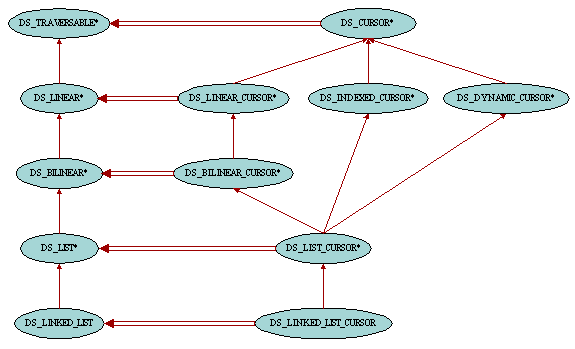
<p>Typically, traversable structures are heirs of class <a
href="flatshort/ds_traversable.html"><font color="#008080"><em><tt>DS_TRAVERSABLE</tt></em></font></a>.
In the <em><strong>external cursor pattern</strong></em>, this
class is only responsible for providing its clients with new
cursors (instances of class <a href="flatshort/ds_cursor.html"><font
color="#008080"><em><tt>DS_CURSOR</tt></em></font></a>). This is
achieved through feature <a
href="flatshort/ds_traversable.html#new_cursor"><font
color="#008080"><em><tt>new_cursor</tt></em></font></a>.
Traversable structures are also equipped with the boolean-valued
query <a href="flatshort/ds_traversable.html#valid_cursor"><font
color="#008080"><em><tt>valid_cursor</tt></em></font></a>
providing a means to check whether a given external cursor can be
used to traverse the current container. Cursors supplied by one
data structure cannot be used to traverse another structure, even
if the structures are of the same type. This is enforced by the
fact that each cursor knows about the structure it is traversing.
Apart from this container reference, class <font color="#008080"><em><tt>DS_CURSOR
</tt></em></font>has a boolean-valued query <a
href="flatshort/ds_cursor.html#off"><font color="#008080"><em><tt>off</tt></em></font></a><font
color="#008080"><em><tt> </tt></em></font>stating whether there
is an element at the current cursor position, and <a
href="flatshort/ds_cursor.html#item"><font color="#008080"><em><tt>item</tt></em></font></a><font
color="#008080"><em><tt> </tt></em></font>returning this element.
Also useful are the two features <a
href="flatshort/ds_cursor.html#same_position"><font
color="#008080"><em><tt>same_position</tt></em></font></a> and <a
href="flatshort/ds_cursor.html#go_to"><font color="#008080"><em><tt>go_to</tt></em></font></a>
which respectively checks whether two cursors point to the same
position in the container and moves the cursor to another
cursor's position.</p>

<p>In the <em><strong>internal cursor pattern</strong></em>, all
features from class <font color="#008080"><em><tt>DS_CURSOR </tt></em></font>are
also available in class <font color="#008080"><em><tt>DS_TRAVERSABLE</tt></em></font>,
the only difference being that feature <font color="#008080"><em><tt>item
</tt></em></font>has been named <a
href="flatshort/ds_traversable.html#item_for_iteration"><font
color="#008080"><em><tt>item_for_iteration</tt></em></font></a>
to avoid name clashes in descendant classes with feature <font
color="#008080"><em><tt>item </tt></em></font>from <font
color="#008080"><em><tt>DS_INDEXABLE</tt></em></font>.</p>

<p>Cursor objects are valid at any time during their existance.
This means that they should be kept synchronized with their data
structure, especially when the container is modified. For example
a cursor pointing to an item which has been removed from the
container won't be valid any more and should be resynchronized.
It is the responsibility of the procedure that alters the
container to keep the cursors (both internal and external) valid
in a deterministic way. Each such procedure in descendant classes
of <font color="#008080"><em><tt>DS_TRAVERSABLE </tt></em></font>will
take the most appropriate action as possible and document it in
its header comment. For example in lists, adding new items will
not move the cursors currently traversing the container, but
removing an item from the list will move any cursor which was at
this position to its next position. So in order to know what will
happen to cursors when altering a container, just check the
header comment of the corresponding procedure first.</p>

<h2>Classes <em><tt>DS_LINEAR</tt></em> and <em><tt>DS_LINEAR_CURSOR</tt></em></h2>

<p>Linear structures are containers which can be traversed in a
linear way, that is the traversal starts from one of its item and
then sequencially moves to the next items until all items have
been visited. Unless the data structure is an ordered container,
two subsequent iterations may not traverse the items in the same
order. An example of containers where items are traversed in a
predictable order is list. Hash table on the other hand is an
example of linear container which is not ordered since items will
be inserted in the container depending on hash codes and table
size and the order can change when the hash table is resized.</p>

<p>The features that are introduced in classes <a
href="flatshort/ds_linear.html"><font color="#008080"><em><tt>DS_LINEAR</tt></em></font></a>
and <a href="flatshort/ds_linear_cursor.html"><font
color="#008080"><em><tt>DS_LINEAR_CURSOR</tt></em></font></a> are
<a href="flatshort/ds_linear_cursor.html#start"><font
color="#008080"><em><tt>start</tt></em></font></a> to initiate
the traversal, <a href="flatshort/ds_linear_cursor.html#forth"><font
color="#008080"><em><tt>forth</tt></em></font></a> to move to the
next item, <a href="flatshort/ds_linear_cursor.html#after"><font
color="#008080"><em><tt>after</tt></em></font></a> to indicate
that all items have been visited, <a
href="flatshort/ds_linear_cursor.html#is_first"><font
color="#008080"><em><tt>is_first</tt></em></font></a> to indicate
whether the cursor is on the first item of the traversal and <a
href="flatshort/ds_linear_cursor.html#go_after"><font
color="#008080"><em><tt>go_after</tt></em></font></a> to abort
the traversal and move the cursor after the last item. Also of
interest is the feature <a
href="flatshort/ds_linear_cursor.html#search_forth"><font
color="#008080"><em><tt>search_forth</tt></em></font></a> which
moves the cursor to the next occurrence of an item according to
the <a href="container.html#DS_SEARCHABLE">searchable mechanism
criteria</a>. Following is a typical example of a linear
traversal:</p>

<blockquote>
    <pre><em>a_cursor </em>:= <em>a_linear</em>.<em>new_cursor
</em><font color="#000080"><em><strong>from</strong></em></font><em> a_cursor</em>.<em>start </em><font
color="#000080"><em><strong>until</strong></em></font><em> a_cursor</em>.<em>after </em><font
color="#000080"><em><strong>loop</strong></em></font><em>
    do_something </em>(<em>a_cursor</em>.<em>item</em>)<em>
    a_cursor</em>.<em>forth
</em><font color="#000080"><em><strong>end</strong></em></font></pre>
</blockquote>

<p>Here is another straightforward example:</p>

<blockquote>
    <pre><em>a_cursor </em>:= <em>a_linear</em>.<em>new_cursor
</em><font color="#000080"><em><strong>from</strong></em></font><em> a_cursor</em>.<em>start </em><font
color="#000080"><em><strong>until</strong></em></font><em> a_cursor</em>.<em>after </em><font
color="#000080"><em><strong>loop</strong></em></font><em>
    </em><font color="#000080"><em><strong>if</strong></em></font><em> a_cursor</em>.<em>item </em>= <font
color="#808000"><em>5</em></font><em> </em><font color="#000080"><em><strong>then</strong></em></font><em>
        found </em>:=<em> </em><font color="#808000"><em>True</em></font><em>
        a_cursor</em>.<em>go_after
    </em><font color="#000080"><em><strong>else</strong></em></font><em>
        a_cursor</em>.<em>forth
    </em><font color="#000080"><em><strong>end</strong></em></font><em>
</em><font color="#000080"><em><strong>end</strong></em></font></pre>
</blockquote>

<p>Note that the examples above also work fine when the container
is empty. This is because the feature <font color="#008080"><em><tt>start
</tt></em></font>moves the cursor <font color="#008080"><em><tt>after
</tt></em></font>when there is no items, hence exiting from the
loop before the first iteration.</p>

<p><font color="#FF0000">We saw in the previous section that it
was the responsibility of the container to keep up-to-date the
cursors currently traversing its items. This implies that the
container internally keeps track of such cursors. Therefore,
after a traversal and/or when the cursor is not needed anymore,
it is important to give a clue to the container that it doesn't
need to take care of this cursor anymore by calling </font><font
color="#008080"><em><tt>go_after</tt></em></font><font
color="#FF0000">. This will allow the container to release its
reference to this cursor and hence allow the garbage collector to
reclaim its memory if necessary. Otherwise <em><strong>memory
leaks</strong></em> as well as performance degradation may
appear.</font></p>

<h2><a name="DS_BILINEAR">Classes <em><tt>DS_BILINEAR</tt></em></a>
and <em><tt>DS_BILINEAR_CURSOR</tt></em></h2>

<p>Bilinear containers are similar to linear containers except
that they can be traversed both forward and backward. Therefore
classes <a href="flatshort/ds_bilinear.html"><font
color="#008080"><em><tt>DS_BILINEAR</tt></em></font></a> and <a
href="flatshort/ds_bilinear_cursor.html"><font color="#008080"><em><tt>DS_BILINEAR_CURSOR</tt></em></font></a>
introduce the counterpart set of features: <a
href="flatshort/ds_bilinear_cursor.html#finish"><font
color="#008080"><em><tt>finish</tt></em></font></a><font
color="#008080"><em><tt> </tt></em></font>to initiate the
traversal, <a href="flatshort/ds_bilinear_cursor.html#back"><font
color="#008080"><em><tt>back</tt></em></font></a><font
color="#008080"><em><tt> </tt></em></font>to move to the previous
item, <a href="flatshort/ds_bilinear_cursor.html#before"><font
color="#008080"><em><tt>before</tt></em></font></a><font
color="#008080"><em><tt> </tt></em></font>to indicate that all
items have been visited, <a
href="flatshort/ds_bilinear_cursor.html#is_last"><font
color="#008080"><em><tt>is_last</tt></em></font></a> to indicate
whether the cursor is on the last item of the traversal, <a
href="flatshort/ds_bilinear_cursor.html#go_before"><font
color="#008080"><em><tt>go_before</tt></em></font></a><font
color="#008080"><em><tt> </tt></em></font>to abort the traversal
and move the cursor before the first item and <a
href="flatshort/ds_bilinear_cursor.html#search_back"><font
color="#008080"><em><tt>search_back</tt></em></font></a> which
moves the cursor to the previous occurrence of an item according
to the <a href="container.html#DS_SEARCHABLE">searchable
mechanism criteria</a>.</p>

<h2>Classes <em><tt>DS_INDEXED_CURSOR</tt></em> and <em><tt>DS_DYNAMIC_CURSOR</tt></em></h2>

<p>The class <a href="flatshort/ds_indexed_cursor.html"><font
color="#008080"><em><tt>DS_INDEXED_CURSOR</tt></em></font></a>
associates the cursor's position with an integer value <a
href="flatshort/ds_indexed_cursor.html#index"><font
color="#008080"><em><tt>index</tt></em></font></a>. It comes with
two other features, <a
href="flatshort/ds_indexed_cursor.html#valid_index"><font
color="#008080"><em><tt>valid_index</tt></em></font></a> which
checks whether a given integer is a valid index value, and <a
href="flatshort/ds_indexed_cursor.html#go_i_th"><font
color="#008080"><em><tt>go_i_th</tt></em></font></a> to move the
cursor to a position specified by its index.</p>

<p>The class <a href="flatshort/ds_dynamic_cursor.html"><font
color="#008080"><em><tt>DS_DYNAMIC_CURSOR</tt></em></font></a> is
equipped with features <a
href="flatshort/ds_dynamic_cursor.html#replace"><font
color="#008080"><em><tt>replace</tt></em></font></a> to change
the item at the cursor position, and <a
href="flatshort/ds_dynamic_cursor.html#swap"><font
color="#008080"><em><tt>swap</tt></em></font></a> to exchange
items between to cursors.</p>

<hr size="1">

<table border="0" width="100%">
    <tr>
        <td><address>
            <font size="2"><b>Copyright © 1999-2005</b></font><font
            size="1"><b>, </b></font><font size="2"><strong>Eric
            Bezault</strong></font><strong> </strong><font
            size="2"><br>
            <strong>mailto:</strong></font><a
            href="mailto:ericb@gobosoft.com"><font size="2">ericb@gobosoft.com</font></a><font
            size="2"><br>
            <strong>http:</strong></font><a
            href="http://www.gobosoft.com"><font size="2">//www.gobosoft.com</font></a><font
            size="2"><br>
            <strong>Last Updated:</strong> 12 February 2005</font><br>
            <!--webbot bot="PurpleText"
            preview="
$Date$ 
$Revision$"
            --> 
        </address>
        </td>
        <td align="right" valign="top"><a
        href="http://www.gobosoft.com"><img
        src="../image/home.gif" alt="Home" border="0" width="40"
        height="40"></a><a href="index.html"><img
        src="../image/toc.gif" alt="Toc" border="0" width="40"
        height="40"></a><a href="container.html"><img
        src="../image/previous.gif" alt="Previous" border="0"
        width="40" height="40"></a><a href="sort.html"><img
        src="../image/next.gif" alt="Next" border="0" width="40"
        height="40"></a></td>
    </tr>
</table>
</body>
</html>