

| Durations | |
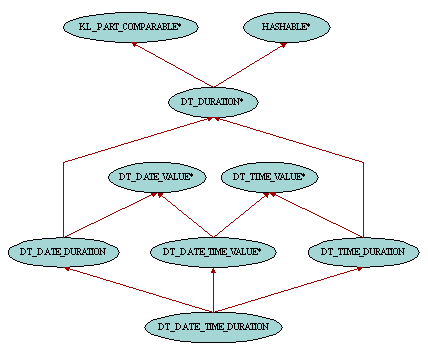
A duration is an amount of time between two dates, two times or two date/times. Durations can therefore be added to an absolute time and hence get a new absolute time shifted on the oriented time axis by the corresponding amount of time. Although time durations can be compared using a total order relationship, we will see that this is not the case for date durations and date/time durations for which the order relationship is only partial because of the irregularities in the Gregorian calendar. Therefore class DT_DURATION is a descendant of KL_PART_COMPARABLE. It also inherits from HASHABLE in order to allow durations to be used as keys in hash tables. Durations can be added together or subtracted using the operators infix "+", infix "-", prefix "+" and prefix "-". There are three kinds of durations. Time durations, instances of class DT_TIME_DURATION, represent the amount of time between two times such as 2 hours and 30 minutes. Date durations, instances of class DT_DATE_DURATION, are amounts of time between two dates such as 1 year and 3 months. And date/time durations, instances of class DT_DATE_TIME_DURATION, are amounts of time between two date/times such as 5 days and 10 hours.
Time durations are made up of hour, minute and second. Contrary to time objects, these features can have arbitrary values such as 36 hours, -6 minutes and 70 seconds. Precision up to the millisecond is also available thanks to the feature millisecond. These four fields of class DT_TIME_DURATION can be set individually or together with the following routines: set_hour, set_minute, set_second, set_millisecond, set_hour_minute_second and set_precise_hour_minute_second. The precise prefix in feature names implies that the millisecond field is involved. Two other routines, second_count and millisecond_count, return the total number of seconds and milliseconds making up the duration.
Although the fields of a time duration can have arbitrary values, there is one special form called canonical where all fields have the same sign and where the absolute value of the number of minutes is between 0 and 59 and absolute value of the number of seconds is between 0 and 59. One can check whether a time duration is canonical using the boolean query is_canonical. Furthermore, given a time duration, there is one and only one equivalent canonical duration. For example the canonical form of 48 hours, -5 minutes and 61 seconds is 47 hours, 56 minutes and 1 second. There are three ways to get a canonical time duration: either call the setting routine set_canonical, call the conversion routine to_canonical to get a new duration object corresponding to the canonical version of the current duration, or call canonical_duration in class DT_TIME. For time duration comparison, the canonical form is used. For example the duration 65 seconds and the other duration 1 minute and 5 seconds are considered equal, whereas 30 minutes is less than -1 hour and 120 minutes because the canonical form of the latter is 1 hour.
Four creation procedures are provided. make requires three arguments to set the hour, minute and second, whereas make_precise needs an extra argument to set the millisecond precision. On the other hand make_canonical and make_precise_canonical create a new canonical time duration based on its total number of seconds or milliseconds.
It is possible to add or subtract hours, minutes, seconds and/or milliseconds to a time duration using features add_hours, add_minutes, add_seconds, add_milliseconds, add_hours_minutes_seconds and add_precise_hours_minutes_seconds with positive or negative arguments. Fields are added field by field. For example adding 25 minutes to the duration 14 hours, 44 minutes and 10 seconds yields 14 hours, 69 minutes and 10 seconds. Conversion routines described above can then be used in order to get a canonical form.
Date durations are made up of year, month and day. Contrary to date objects, these features can have arbitrary values such as 2 years, -18 months and 3 days. These three fields of class DT_DATE_DURATION can be set individually or together with the following routines: set_year, set_month, set_day and set_year_month_day.
Because of the irregularities in the Gregorian calendar, the months in a year don't have the same number of days. For example there are 31 days in January whereas there are only 30 days in April and 28 or 29 days in Februay depending on whether the year is a leap year or not. As a consequence a duration of 1 month is either made up of 28, 29, 30 or 31 days depending on the date to which the duration is to be added. For example adding 1 month to the date 20 April 2000 is equivalent to adding 30 days whereas adding 1 month to the date 5 May 2000 is equivalent to adding 31 days. Therefore date durations are not deterministic. One way to address this problem is to use definite durations. A date duration is said to be definite when it is expressed only in terms of days, leaving the year and month parts empty. For example the duration 40 days is definite where as 2 months and 3 days is not. One can check whether a date duration is definite or not by calling the boolean query is_definite. There are three ways to get a definite date duration: either call the setting routine set_definite, call the conversion routine to_definite to get a new duration object corresponding to the definite version of the current duration, or call duration in class DT_DATE. Note that the first two routines need a date as argument which is used as origin in order to make the duration deterministic before the conversion.
As for time duration, canonical forms are also available for date duration. A date duration is canonical when its fields have all the same sign and when the absolute value of the number of days is the smallest possible one and the absolute value of the number of months is between 0 and 11. Here again, because of the irregularities in the Gregorian calendar, the canonical form depends on the date to which the duration is to be added. For example the canonical form of the duration 34 days when to be added to the date 23 September 2000 is 1 month and 4 days, whereas it will only be 1 month and 3 days when to be added to the date 12 October 2000. Note that this might become tricky in some cases. For example the canonical duration between 31 May 2000 and 30 June 2000 is 1 month and not 30 days! Indeed, if we follow the definition of canonical duration, 0 day is smaller than 30 days and adding 1 month to 31 May 2000 yields the expected date thanks to the truncation of the day which occurs in the addition routines of class DT_DATE. There are three ways to get a canonical date duration: either call the setting routine set_canonical, call the conversion routine to_canonical to get a new duration object corresponding to the canonical version of the current duration, or call canonical_duration in class DT_DATE. Note that for the same reason as for definite durations, the first two routines need a date as argument.
Two creation procedures are provided. make requires three arguments to set the year, month and day. On the other hand make_definite just needs the number of days since the number of years and months will be set to zero in order to get a definite date duration.
It is possible to add or subtract years, months and/or days to a date duration using features add_years, add_months, add_days and add_years_months_days with positive or negative arguments. For example adding 8 months to the date duration 3 years, 11 months and 23 days yields 3 years, 19 months and 23 days.
Since a month is not always equivalent to the same number of days, the comparison of date durations is a partial order relationship. For example it is impossible to say whether 1 month is less than, equal to or greater than 30 days. It depends on the date that we use as origin for the operations with these durations. Therefore DT_DATE_DURATION is not a descendant of COMPARABLE but inherits from KL_PART_COMPARABLE instead. The comparison routines are implemented as follows. On one side we compare the day part of the two date durations. On the other side we convert the year part into months (1 year yields 12 months), add them to the month part and then compare the results. If the comparisons on both sides give the same results, then this is the result of the global comparison routine, otherwise we return false. For example the duration 2 years and 2 days is equal to 1 year, 12 months and 2 days; the duration 2 months and 5 days is less than 1 year and 10 days. However we cannot say much about the duration 2 months and 1 day and the other duration 1 month and 31 days. On one side the day part is smaller, but on the other side the combination of the month and year parts is larger. Without the hint of the date to which these durations will be added we have no choice but return false in all comparison routines.
Date/time durations are a combination of a date duration and a time duration. They are made up of year, month, day, hour, minute, second and millisecond. Class DT_DATE_TIME_DURATION is equipped with the same setting routines as DT_DATE_DURATION and DT_TIME_DURATION. In addition to the features inherited from these two classes, one can also get or set the date duration and the time duration parts of a date/time duration with routines date_duration, time_duration, set_date_duration and set_time_duration. It is worthwhile to note that the two routines second_count and millisecond_count, inherited from DT_TIME_DURATION, return the total number of seconds and milliseconds making up only the time duration part of the date/time duration. The date duration part is not taken into account in this calculation.
As we already noticed for date duration, date/time durations are not deterministic because of the irregularities in the Gregorian calendar. For example adding 1 month and 1 hour to the date 20 April 2000 at 10:12:30 is equivalent to adding 30 days and 1 hour whereas adding 1 month and 1 hour to the date 5 May 2000 and 10:12:30 is equivalent to adding 31 days and 1 hour. One way to address this problem is to use definite durations. A date/time duration is said to be definite when it is expressed only in terms of days, hours, minutes and seconds, leaving the year and month parts empty. For example the duration 40 days and 2 minutes is definite where as 2 months, 3 days and 1 hour is not. One can check whether a date/time duration is definite or not by calling the boolean query is_definite. There are three ways to get a definite date/time duration: either call the setting routine set_definite, call the conversion routine to_definite to get a new duration object corresponding to the definite version of the current duration, or call duration in class DT_DATE_TIME. Note that the first two routines need a date/time as argument which is used as origin in order to make the duration deterministic before the conversion.
Although the fields of a date/time duration can have arbitrary values, there is one special form called canonical where all fields have the same sign and where the absolute value of the number of days is the smallest possible one, the absolute value of the number of months is between 0 and 11, the absolute value of the number of hours is between 0 and 23, the absolute value of the number of minutes is between 0 and 59 and absolute value of the number of seconds is between 0 and 59. Here again, because of the irregularities in the Gregorian calendar, the canonical form depends on the date/time to which the duration is to be added. For example the canonical form of the duration 34 days and 72 minutes when to be added to the date/time 23 September 2000 at 14:05:00 is 1 month, 4 days, 1 hour and 2 minutes, whereas it will only be 1 month, 3 days, 1 hour and 2 minutes when to be added to the date 12 October 2000 at 14:05:00. Note that this might become tricky in some cases. For example the canonical duration between 31 May 2000 at 17:45:00 and 30 June 2000 at 18:00:00 is 1 month and 15 minutes and not 30 days and 15 minutes! Indeed, if we follow the definition of canonical duration, 0 day is smaller than 30 days and adding 1 month and 15 minutes to 31 May 2000 at 17:45:00 yields the expected date thanks to the truncation of the day which occurs in the addition routines of class DT_DATE_TIME. There are three ways to get a canonical date/time duration: either call the setting routine set_canonical, call the conversion routine to_canonical to get a new duration object corresponding to the canonical version of the current duration, or call canonical_duration in class DT_DATE_TIME. Note that for the same reason as for definite durations, the first two routines need a date/time as argument. One can check whether a date/time duration is canonical using the boolean query is_canonical. There is also a way to check whether the time duration part of a date/time duration is canonical with the boolean query is_time_canonical. This will be true when all fields of the time duration part have the same sign as the day part and when the absolute value of the number of hours is between 0 and 23, the absolute value of the number of minutes is between 0 and 59 and absolute value of the number of seconds is between 0 and 59. Because the year and month parts are not involved here, there is no need to provide a date/time as origin when calling set_time_canonical and to_time_canonical which are the counterparts of set_canonical and to_canonical.
Eight creation procedures are provided. make requires six arguments to set the year, month, day, hour, minute and second, whereas make_precise needs an extra argument to set the millisecond precision. On the other hand make_from_date_time_duration and make_from_date_duration create a new date/time duration based on its date duration and time duration parts. make_definite just needs the number of days along with the number of hours, minutes and seconds since the number of years and months will be set to zero in order to get a definite date/time duration. The creation procedure make_precise_definite is similar to make_definite except that it needs an extra argument to set the millisecond precision. Finally make_canonical_definite and make_precise_canonical_definite create a new definite date/time duration based on its total number of seconds or milliseconds. The time duration part of the resulting date/time duration will be canonical as defined by is_time_canonical above.
It is possible to add or subtract years, months, days, hours, minutes, seconds and/or milliseconds to a date/time duration using features add_years, add_months, add_days, add_years_months_days, add_hours, add_minutes, add_seconds, add_milliseconds, add_hours_minutes_seconds and add_precise_hours_minutes_seconds with positive or negative arguments. For example adding 8 months and 2 hours to the date/time duration 3 years, 11 months, 23 days, 23 hours and 12 minutes yields 3 years, 19 months, 23 days, 25 hours and 12 minutes.
Since a month is not always equivalent to the same number of days, the comparison of date/time durations is a partial order relationship. For example it is impossible to say whether 1 month and 2 hours is less than, equal to or greater than 30 days and 2 hours. It depends on the date/time that we use as origin for the operations with these durations. Therefore DT_DATE_TIME_DURATION is not a descendant of COMPARABLE but inherits from KL_PART_COMPARABLE instead. The comparison routines are implemented as follows. On one side we compare the day and time duration parts of the two date/time durations using their time-canonical forms. On the other side we convert the year part into months (1 year yields 12 months), add them to the month part and then compare the results. If the comparisons on both sides give the same results, then this is the result of the global comparison routine, otherwise we return false. For example the duration 2 years, 2 days and 34 minutes is equal to 1 year, 12 months, 1 day, 24 hours and 34 minutes; the duration 2 months, 5 days and 2 hours is less than 1 year, 10 days and 1 hour. However we cannot say much about the duration 2 months, 1 day and 2 hours and the other duration 1 month, 31 days and 2 hours. On one side the combination of day and time duration parts is smaller, but on the other side the combination of the month and year parts is larger. Without the hint of the date/time to which these durations will be added we have no choice but return false in all comparison routines.
|
Copyright © 2000-2005, Eric
Bezault mailto:ericb@gobosoft.com http://www.gobosoft.com Last Updated: 21 February 2005 |
  |