<!DOCTYPE HTML PUBLIC "-//IETF//DTD HTML//EN">
<html>

<head>
<meta http-equiv="Content-Type"
content="text/html; charset=iso-8859-1">
<meta name="GENERATOR" content="Microsoft FrontPage 2.0">
<title>Lists</title>
</head>

<body bgcolor="#FFFFFF">

<table border="0" width="100%">
    <tr>
        <td><font size="6"><strong>Lists</strong></font></td>
        <td align="right"><a href="sort.html"><img
        src="../image/previous.gif" alt="Previous" border="0"
        width="40" height="40"></a><a href="table.html"><img
        src="../image/next.gif" alt="Next" border="0" width="40"
        height="40"></a></td>
    </tr>
</table>

<hr size="1">

<p align="center"><!--webbot bot="ImageMap" startspan
rectangle=" (370,234) (460, 267)  flatshort/ds_bilinkable.html"
rectangle=" (215,236) (319, 267)  flatshort/ds_bilinked_list.html"
rectangle=" (373,160) (459, 191)  flatshort/ds_linkable.html"
rectangle=" (220,161) (312, 192)  flatshort/ds_linked_list.html"
rectangle=" (77,161) (183, 192)  flatshort/ds_arrayed_list.html"
rectangle=" (374,86) (456, 116)  flatshort/ds_cell.html"
rectangle=" (16,85) (107, 118)  flatshort/ds_resizable.html"
rectangle=" (159,87) (236, 116)  flatshort/ds_list.html"
rectangle=" (211,12) (306, 41)  flatshort/ds_indexable.html"
rectangle=" (93,11) (170, 40)  flatshort/ds_bilinear.html"
src="image/list.gif" border="0" width="477" height="281" --><MAP NAME="FrontPageMap0"><AREA SHAPE="RECT" COORDS="370, 234, 460, 267" HREF="flatshort/ds_bilinkable.html"><AREA SHAPE="RECT" COORDS="215, 236, 319, 267" HREF="flatshort/ds_bilinked_list.html"><AREA SHAPE="RECT" COORDS="373, 160, 459, 191" HREF="flatshort/ds_linkable.html"><AREA SHAPE="RECT" COORDS="220, 161, 312, 192" HREF="flatshort/ds_linked_list.html"><AREA SHAPE="RECT" COORDS="77, 161, 183, 192" HREF="flatshort/ds_arrayed_list.html"><AREA SHAPE="RECT" COORDS="374, 86, 456, 116" HREF="flatshort/ds_cell.html"><AREA SHAPE="RECT" COORDS="16, 85, 107, 118" HREF="flatshort/ds_resizable.html"><AREA SHAPE="RECT" COORDS="159, 87, 236, 116" HREF="flatshort/ds_list.html"><AREA SHAPE="RECT" COORDS="211, 12, 306, 41" HREF="flatshort/ds_indexable.html"><AREA SHAPE="RECT" COORDS="93, 11, 170, 40" HREF="flatshort/ds_bilinear.html"></MAP><img src="image/list.gif" border="0" width="477" height="281" usemap="#FrontPageMap0"><!--webbot
bot="ImageMap" i-checksum="10739" endspan --></p>

<h2>Class <em><tt>DS_LIST</tt></em></h2>

<p>A list is an ordered sequence of items. This doesn't
necessarily mean that the items are sorted but rather that the
container can be traversed in a predictable way. Thanks to
multiple inheritance, <a href="flatshort/ds_list.html"><font
color="#008080"><em><tt>DS_LIST</tt></em></font></a><font
color="#008080"><em><tt> </tt></em></font>is equipped with
several basic facilities: lists can be <a
href="traversal.html#DS_BILINEAR">traversed</a> forward and
backward, they can be <a href="sort.html">sorted</a>, they can be
<a href="container.html#DS_SEARCHABLE">searched</a> and their
items can also be <a href="container.html#DS_INDEXABLE">accessed
by index</a>.</p>

<p>Items can be added to or removed from the list relative to
their index position thanks to the features inherited from <a
href="flatshort/ds_indexable.html"><font color="#008080"><em><tt>DS_INDEXABLE</tt></em></font></a>.
Examples of such features are <a
href="flatshort/ds_list.html#put"><font color="#008080"><em><tt>put</tt></em></font></a>
and <a href="flatshort/ds_list.html#force"><font color="#008080"><em><tt>force</tt></em></font></a>
to add one item at a time, <a
href="flatshort/ds_list.html#extend"><font color="#008080"><em><tt>extend</tt></em></font></a>
and <a href="flatshort/ds_list.html#append"><font color="#008080"><em><tt>append</tt></em></font></a>
to add several items at once, <a
href="flatshort/ds_list.html#remove"><font color="#008080"><em><tt>remove</tt></em></font></a>
to remove one item and <a href="flatshort/ds_list.html#prune"><font
color="#008080"><em><tt>prune</tt></em></font></a> to remove
several items. For convenience, these routines also have two
counterparts which deal with the first item of the list (at index
1) and the last item of the list (at index <a
href="flatshort/ds_list.html#count"><font color="#008080"><em><tt>count</tt></em></font></a>).
For instance, in order to add an item <font color="#008080"><em><tt>v
</tt></em></font>at the beginning of the list, one can just call<font
color="#008080"><em><tt> </tt></em></font><a
href="flatshort/ds_list.html#put_first"><font color="#008080"><em><tt>put_first</tt></em></font></a><font
color="#008080"><em><tt> </tt></em><tt>(</tt><em><tt>v</tt></em><tt>)</tt></font>
which is just a synomym of<font color="#008080"><em><tt> </tt></em></font><a
href="flatshort/ds_list.html#put"><font color="#008080"><em><tt>put</tt></em></font></a><font
color="#008080"><em><tt> </tt></em><tt>(</tt><em><tt>v</tt></em><tt>,</tt><em><tt>
1</tt></em><tt>)</tt></font>.</p>

<p>But <font color="#008080"><em><tt>DS_LIST</tt></em></font>
also introduces other features to add and remove items relative
to a <a href="traversal.html#DS_CURSOR">cursor</a> position.
Considering that the first item of the list is graphically
located to the left, the last item to the right, and other items
ordered in-between, one can add items to the left or to the right
of a given cursor and remove items to the left, to the right or
at the cursor position. For example, in order to add an item <font
color="#008080"><em><tt>v </tt></em></font>to the right of <font
color="#008080"><em><tt>cursor</tt></em></font> position in <font
color="#008080"><em><tt>list</tt></em></font>, one can just call <font
color="#008080"><em><tt>list</tt></em><tt>.</tt></font><a
href="flatshort/ds_list.html#put_right_cursor"><font
color="#008080"><em><tt>put_right_cursor</tt></em></font></a><font
color="#008080"><em><tt> </tt></em><tt>(</tt><em><tt>v</tt></em><tt>,</tt><em><tt>
cursor</tt></em><tt>)</tt></font>. Alternatively one can call <font
color="#008080"><em><tt>cursor</tt></em><tt>.</tt></font><a
href="flatshort/ds_list_cursor.html#put_right"><font
color="#008080"><em><tt>put_right</tt></em></font></a><font
color="#008080"><em><tt> </tt></em><tt>(</tt><em><tt>v</tt></em><tt>)</tt></font>.
Because of the design decision which was taken to have both
internal and external <a href="traversal.html">cursors</a>,
similar routines acting relatively to the internal cursor
position of the list are available as well. These routines have
the same names as their external cursor counterparts except that
they don't have the suffix<font color="#008080"><em><tt> _cursor</tt></em></font>.
Therefore <font color="#008080"><em><tt>list</tt></em><tt>.</tt></font><a
href="flatshort/ds_list.html#put_right"><font color="#008080"><em><tt>put_right</tt></em></font></a><font
color="#008080"><em><tt> </tt></em><tt>(</tt><em><tt>v</tt></em><tt>)
</tt></font>will add an item <font color="#008080"><em><tt>v</tt></em></font>
to the right of current internal cursor position of the <font
color="#008080"><em><tt>list</tt></em></font>.</p>

<p>Class <a href="flatshort/ds_list.html"><font color="#008080"><em><tt>DS_LIST</tt></em></font></a><font
color="#008080"><em><tt> </tt></em></font>and its associated
cursor class <a href="flatshort/ds_list_cursor.html"><font
color="#008080"><em><tt>DS_LIST_CURSOR</tt></em></font></a><font
color="#008080"><em><tt> </tt></em></font>have many other
features which have not been described here. Please have a look
at their flat-short forms for details.</p>

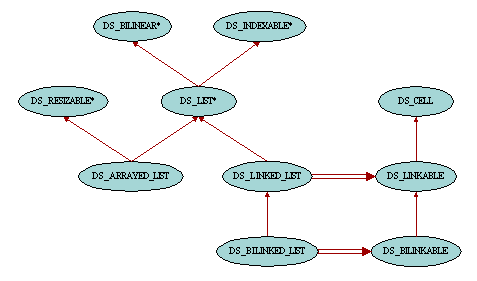
<p>The <em>Gobo Eiffel Structure Library</em> provides three
implementations for list containers: <a href="#DS_LINKED_LIST"><font
color="#008080"><em><tt>DS_LINKED_LIST</tt></em></font></a><font
color="#008080"><em><tt> </tt></em></font>implemented with singly
linkable cells, <a href="#DS_BILINKED_LIST"><font color="#008080"><em><tt>DS_BILINKED_LIST</tt></em></font></a><font
color="#008080"><em><tt> </tt></em></font>with doubly linkable
cells and <a href="#DS_ARRAYED_LIST"><font color="#008080"><em><tt>DS_ARRAYED_LIST</tt></em></font></a><font
color="#008080"><em><tt> </tt></em></font>implemented with an
array. The reason for having all these different implementations
is that they have different memory space or time performance. But
one is not better that the others, it just depends on the kind of
operations to be applied to the list and on the memory/time
tradeoff one is ready to accept. In order to help you choose the
most appropriate list implementation for a particular use, the
information about the complexity of the operations has been added
to the header comment of almost all of the access, insertion and
removal routines. For example, in the header comment of feature <a
href="flatshort/ds_arrayed_list.html#put_first"><font
color="#008080"><em><tt>put_first</tt></em></font></a> in class <font
color="#008080"><em><tt>DS_ARRAYED_LIST</tt></em></font> one can
read<font color="#008080"><tt> -- (Performance: O(</tt><em><tt>count</tt></em><tt>).)</tt></font>.
This means that the execution time is on average proportional to
the number of items in the list. On the other hand the header
comment of <a href="flatshort/ds_linked_list.html#put_first"><font
color="#008080"><em><tt>put_first</tt></em></font></a><font
color="#008080"><em><tt> </tt></em></font>in class <font
color="#008080"><em><tt>DS_LINKED_LIST</tt></em></font> says<font
color="#008080"><tt> -- (Performance: O(1).)</tt></font>. This
means that the execution time is bounded by a constant. But this
doesn't mean that class <font color="#008080"><em><tt>DS_LINKED_LIST</tt></em></font>
has a better implementation than <font color="#008080"><em><tt>DS_ARRAYED_LIST</tt></em></font>.
For example routine <font color="#008080"><em><tt>go_i_th</tt></em></font>
will perform better with <font color="#008080"><em><tt>DS_ARRAYED_LIST</tt></em></font>.</p>

<h2><a name="DS_LINKED_LIST">Class <em><tt>DS_LINKED_LIST</tt></em></a></h2>

<p>A list of type <a href="flatshort/ds_linked_list.html"><font
color="#008080"><em><tt>DS_LINKED_LIST</tt></em></font></a><font
color="#008080"><em><tt> </tt></em></font>is made up of
individual linkable cells, instances of class <a
href="flatshort/ds_linkable.html"><font color="#008080"><em><tt>DS_LINKABLE</tt></em></font></a>,
each of these cells containing an item of the list and being
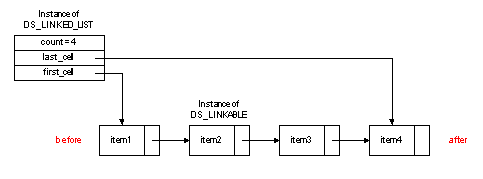
linked to the cell containing the next item. Following is a
simplified graphical representation of the memory layout of a
linked list.</p>

<p align="center"><img src="../structure/image/linked_list.gif"
width="483" height="179"></p>

<p>After a quick look at this picture, it is easy to understand
that traversing the list from left to right will be quite
efficient since each cell has a reference to its right neighbor.
However, backward traversals will be expensive since the cells
will have to be visited from the first cell to the cell on the
left of the current position each time <a
href="flatshort/ds_linked_list.html#back"><font color="#008080"><em><tt>back</tt></em></font></a>
is called. Likewise, insertions and deletions to the right of a
cursor position will be cheap whereas they will be expensive if
they happen to the left of the cursor. And finally, thanks to the
reference to the last cell of the list, insertions to the end of
the list do not require the full list to be traversed, making a
good tradeoff between memory space and execution time.</p>

<h2><a name="DS_BILINKED_LIST">Class <em><tt>DS_BILINKED_LIST</tt></em></a></h2>

<p>The inefficiencies that we pointed out in the linked
implementation of lists can be easily addressed just by using
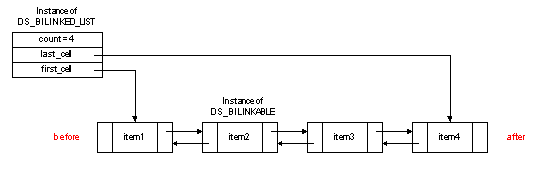
linkable cells which not only have a reference to their right
neighbor but also keep a reference to their left neighbor. Class <a
href="flatshort/ds_bilinked_list.html"><font color="#008080"><em><tt>DS_BILINKED_LIST</tt></em></font></a>
provides such an implementation since it uses <a
href="flatshort/ds_bilinkable.html"><font color="#008080"><em><tt>DS_BILINKABLE</tt></em></font></a>
cells.</p>

<p align="center"><img src="../structure/image/bilinked_list.gif"
width="537" height="169"></p>

<p>As always, what we gained in execution time improvement, we
lost it in memory occupation as we can see on the above picture.
Therefore, when you need a list which requires to call more than
occasionally features such as <font color="#008080"><em><tt>back</tt></em></font>
and the like, you are better off using <font color="#008080"><em><tt>DS_BILINKED_LIST</tt></em></font>.
Otherwise, there is no need to waste memory space when <font
color="#008080"><em><tt>DS_LINKED_LIST </tt></em></font>would
just do the job as efficiently.</p>

<h2><a name="DS_ARRAYED_LIST">Class <em><tt>DS_ARRAYED_LIST</tt></em></a></h2>

<p>One thing that <font color="#008080"><em><tt>DS_LINKED_LIST </tt></em></font>and
<font color="#008080"><em><tt>DS_BILINKED_LIST </tt></em></font>are
not good at is accessing and modifying the list based on the
index values. This is simply because these operations would
require to traverse the cells one by one until as many cells as
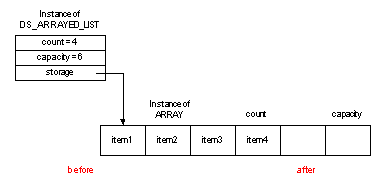
the given index have been visited. Class <a
href="flatshort/ds_arrayed_list.html"><font color="#008080"><em><tt>DS_ARRAYED_LIST</tt></em></font></a><font
color="#008080"><em><tt> </tt></em></font>provides an
implementation based on <font color="#008080"><em><tt>ARRAY</tt></em></font>,
and therefore addresses this problem.</p>

<p align="center"><img src="image/arrayed_list.gif" width="390"
height="188"></p>

<p>On the other hand, the class <font color="#008080"><em><tt>DS_ARRAYED_LIST
</tt></em></font>is not very good at inserting or removing items
unless they are at the end of the list. This is because the items
to the right of the altered position have to be moved either to
the right (insertion) or to the left (removal). Also, to avoid
too many resizings of the array when inserting items to the list,
the allocated space is often larger than the number of items
actually held in the list. Therefore you should use <font
color="#008080"><em><tt>DS_ARRAYED_LIST </tt></em></font>if most
of your insertion and removal operations are applied to the end
of the list, if you know in advance the number of items that will
be held in the list to avoid wasting time resizing the underlying
array, and if you often access items by index. Otherwise, and in
particular if items are most of the time inserted in or removed
from the middle or beginning of the list, singly and doubly
linked implementation of list is propably what you need.</p>

<hr size="1">

<table border="0" width="100%">
    <tr>
        <td><address>
            <font size="2"><b>Copyright © 1999-2005</b></font><font
            size="1"><b>, </b></font><font size="2"><strong>Eric
            Bezault</strong></font><strong> </strong><font
            size="2"><br>
            <strong>mailto:</strong></font><a
            href="mailto:ericb@gobosoft.com"><font size="2">ericb@gobosoft.com</font></a><font
            size="2"><br>
            <strong>http:</strong></font><a
            href="http://www.gobosoft.com"><font size="2">//www.gobosoft.com</font></a><font
            size="2"><br>
            <strong>Last Updated:</strong> 13 February 2005</font><br>
            <!--webbot bot="PurpleText"
            preview="
$Date$ 
$Revision$"
            --> 
        </address>
        </td>
        <td align="right" valign="top"><a
        href="http://www.gobosoft.com"><img
        src="../image/home.gif" alt="Home" border="0" width="40"
        height="40"></a><a href="index.html"><img
        src="../image/toc.gif" alt="Toc" border="0" width="40"
        height="40"></a><a href="sort.html"><img
        src="../image/previous.gif" alt="Previous" border="0"
        width="40" height="40"></a><a href="table.html"><img
        src="../image/next.gif" alt="Next" border="0" width="40"
        height="40"></a></td>
    </tr>
</table>
</body>
</html>